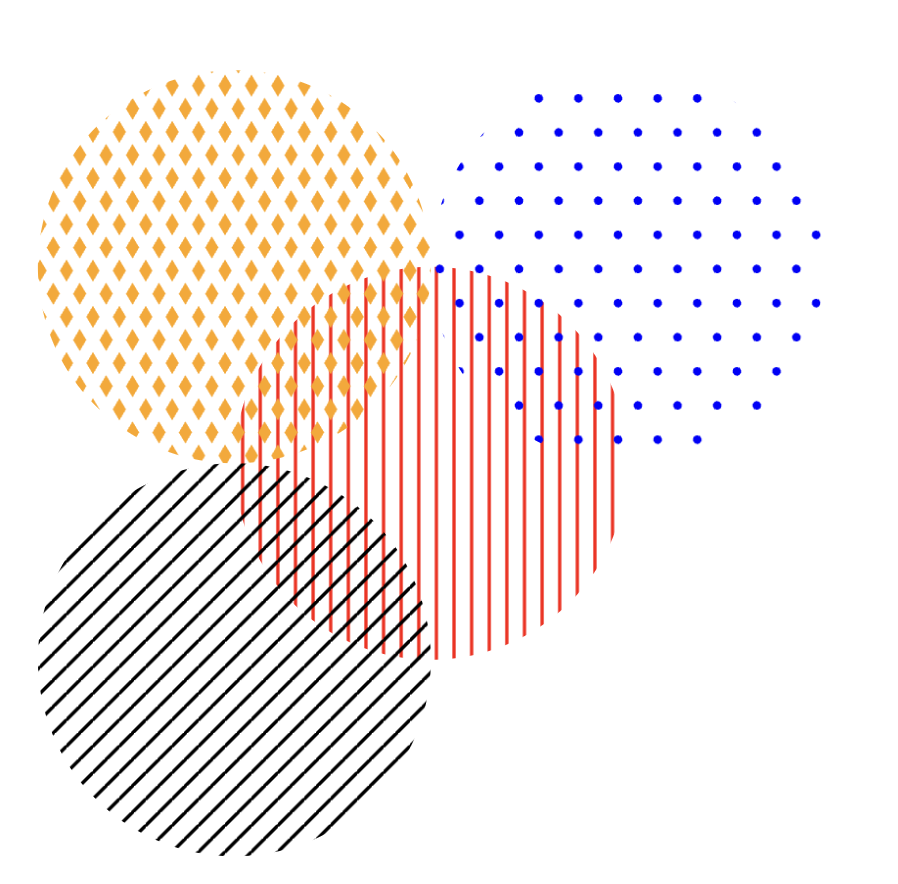
I can’t check anymore because fillStyle is not currently an attribute, so my activity currently shows as having an error. But if I recall correctly, there wasn’t a separate dial for the fill pattern lines that I could control. Duane mentioned that the fill pattern lines were not obeying the fill opacity.
I was doing something like this:
<styleDefinition styleNumber="9" fillopacity="0.25" fillColor="$c_Ap" lineColor="$c_Ap" linewidth="0" lineStyle="solid" fillStyle="dots" fillPatternOpacity="0.7"/>
I had A LOT of overlapping regions (a 3 set Venn Diagram), and just using solid colors wasn’t cutting it in being able to see what was double (or triple) shaded at any moment.
I’m not sure why this isn’t working. fillStyle should work, but it is only available with the development version. You have to set DoenetML version to “0.7dev”. It won’t work, and you’ll get an error, if you are using regular version 0.7., at least until we release a new official release. (I do want to make sure that these fill attributes were what people want before I make an official release.)
I made fill patterns now obey fillPatternOpacity. That was the extra dial I ended up adding.
I had not thought about the opacity of the background of the fill when we had a fill pattern. In what I have so far, that always has 0 opacity (completely transparent).
I’m thinking of making the attribute fillOpacity apply to the background of the fill patterns. Since it defaults to 0.3 (except for 0.7 on the black style number 5), you would need to explicitly set fillOpacity to 0 to keep the current behavior.
Does that seem reasonable?
One other question: should I keep fillPatternOpacity as it is or would it be better named fillForegroundOpacity?
I’m not quite sure that I understood David’s concern about the fill opacity. But I like your idea of having the fillOpacity apply to the background fill.
I want background of the fill behave like a normal fill does right now, and the fill pattern to just be slightly darker than that. I’m thinking that a pattern fill is actually TWO layers: a background fill and a pattern fill on top of that. Even if they were the same opacity, it would naturally “stack” and darken up, right?
Right, I’m thinking of it having two layers. If you wanted the intersection between a vertical hashed region and or horizontal hashed region to look like it was cross-hatched, then you’d want the background fill to be transparent. That’s one reason to have fillOpacity and fillPatternOpacity be separate dials.
I released a new dev version where pattern fills now have two layers: a background (color of the canvas) layer of opacity fillOpacity and a foreground pattern color of opacity fillPatternOpacity.
I’m not sure I can see how it is working?
I see it working on “vertical” and a little bit on “diamonds”. But fillOpacity seems to do nothing on “dots”. I’ve changed it between 0 and 1 with no noticeable change.
<styleDefinition styleNumber="1" fillOpacity="0" fillColor="red" lineColor="red" linewidth="0" lineStyle="solid" fillStyle="vertical" fillPatternOpacity="1"/>

<styleDefinition styleNumber="2" fillOpacity="1" fillColor="blue" lineColor="blue" linewidth="0" lineStyle="solid" fillStyle="dots" fillPatternOpacity="1"/>

<styleDefinition styleNumber="3" fillOpacity="1" fillColor="orange" lineColor="orange" linewidth="0" lineStyle="solid" fillStyle="diamonds" fillPatternOpacity="1"/>

<styleDefinition styleNumber="4" fillOpacity="1" fillColor="black" lineColor="black" linewidth="0" lineStyle="solid" fillStyle="diagonal" fillPatternOpacity="1"/>

<graph displayXAxis="false" displayYAxis="false" fixAxes size="large">
  <circle radius="3" center="(0,0)" styleNumber="1" filled/>
   <circle radius="3" center="(3,3)" styleNumber="2" filled/>
   <circle radius="3" center="(-3,3)" styleNumber="3" filled/>
  <circle radius="3" center="(-3,-3)" styleNumber="4" filled/>
</graph>
I think your browser has the old dev version still cached. You want dev.335 or higher. When I first viewed your document, I saw the same thing as you show in your screenshot. But, then when I did an “Empty Cache and Hard Reload” on Chrome, I got the new version and the white background behind the dots became opaque.