Welcome to the June Virtual Workshop! We hope it’s been a fun time so far.
Please work through the tasks on this page.
Once you are finished, use the “Create Assignment” button in Doenet, publish your activity. Set a deadline of 1 PM Eastern the following day, choose “different variant per student,” and generate a class code or shareable link. Paste the code or link as a reply to this post before 11 AM Eastern the following day.
Sometime before tomorrow’s workshop, please work through at least one other participant’s activity by typing in reasonable and unreasonable answers to give a variety of feedback. ‘Like’ their post to indicate which activity you have completed.
a question I have: after I create assignment and publish it, if I make changes to the activity, would the assignment using that activity update automatically? or do I need to create a new assignment?
A new assignment needs to be created. It becomes a problem with submitted and graded student work.
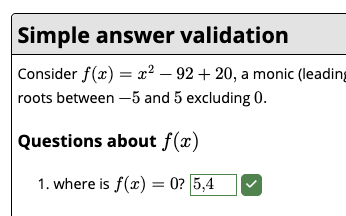
@Xinli_Wang, no need to change it and share a new activity but your f(x) definition has 92 instead of 9x 
Here’s my assignment:
Looking forward to seeing you all again!
1 Like
Having trouble with my document and can’t even make it public because I am missing shortDescription/labels, so it is unlisted, but here is the link. I am thinking I need to start over and go line by line to see how to fix it. ALso, I can’t make the select all in question 2 be 50/50 if they get partial credit. I have several errors that show you can’t have within the
which I get, but what is the work around? Page
For these initial activities, making it unlisted is the way to go. No need to worry about making it public until you want people to find it by searching for it.
For an ordered list <ol>, the only allowed children are list items <li>s. Everything else, like an <answer> should be inside an <li>. Something like this is fine:
<ol>
  <li>
    <answer><label>1+1=</label>2</answer>
  <li>
  <li>
    <p><answer><label>1+2=</label>3</answer></p>
    <p><answer><label>1+3=</label>4</answer></p>
  </li>
</ol>
In those examples, I didn’t need a short description as I had labels.
Also, be sure that every tag has a matching closing that and that they are nested. Tags cannot be interleaved. For example
<p><answer>x</p></answer>
will make Doenet mad, as the <p> and <answer> are interleaved. A proper nesting would be
<p><answer>x</answer></p>
Try adding a matchPartial attribute to the <answer> or the <choiceInput>.
Public documents appear in the Explore section of the website where people can search for your activity. A decision was made to only allow activities to be made public once they were free of errors and had no known accessibility violations. We will talk a lot more about accessibility on Day 4 so for now it’s ok to share an unlisted activity for feedback. I should have made this clearer - my apologies.
Let’s fix things for now. You are almost there…
On line 19, you write
<p> <m>x=</m><answer unorderedCompare><shortDescription4,5 </answer></p></li>
If you modify this to
<p> <m>x=</m><answer unorderedCompare>4,5 </answer></p></li>
by taking out the incomplete shortDescription component, or
<p> <m>x=</m><answer unorderedCompare><label>Where is <m>f(x)=0</m>?</label>4,5</answer></p></li>
by sharing the question within the label, you will get rid of the first error.
The second error is even easier to fix. If you look carefully at line 32, <li> <answer name="answer3"><label>What is <m>f(0)</m>? </label>, you’ll notice that you open an <li> component, but there is no closing </li> component at the end of the line. Similarly, you have an open <answer> tag in the same line but no closing </answer> tag. In line 34 there is a closing </answer> tag but no opening one.
Can you share what you were trying to do around those lines? We can try to offer suggestions on how to accomplish that goal.
Here are the errors I am getting:
I am stuck on the second question should give partial credit for either correct answer and full credit for both correct answers. I am not able to get it to work with my code.
You can ignore those accessibility errors for now. But, if you click on the errors panel (the stop sign), you’ll see the error
Line #33 Invalid DoenetML: Found closing tag </answer>, but no corresponding opening tag
You’ll want to fix that by deleting the stray </answer>.
For the partial credit problem, did you try adding matchPartial to either the <answer> or the <choiceInput>? When you did that, what happened? That should do the trick.
May I know how to check who attempted my assignment and what their grades are?
I’m thinking about the scenario of assigning HW to my class and how to track their grades.
I was able to figure out the code and correct it. Thank you for your help.
Thanks! How do you link a student with their ID and export their grades to a gradebook?
If there is only name information available for submissions, I’m not sure whether that’s enough for me to keep a record of their grades for a class of 120 students.
Our current course features are intentionally minimal. We have plans for addressing the concern you raise, but we will not have anything available for this coming year.
We don’t currently have a way to store other identifiers of students such as an outside ID. If you tell students that they need to log in before completing an assignment, then they will be able to create and update a first name and a last name for their Doenet account. When you download the scores of an assignment, their record will be identified by those names, as well as the internal student id that identifies them uniquely on the Doenet website.
1 Like
What LMS are you using, @Xinli_Wang ?