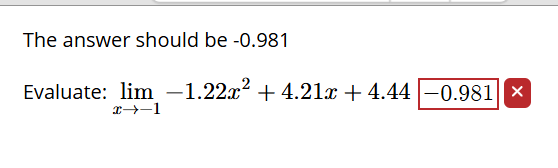
Hey, I’m trying to randomize, and the evaluation seems to mark everything wrong. What am I missing?
Here’s my code:
<selectRandomNumbers from="-2" to="6" name="a" hide="true"/>
<selectRandomNumbers from="2" to="6" name="b" hide="true"/>
<selectRandomNumbers from="2" to="10" name="c" hide="true"/>
<p>The answer should be
  <number>$a-$b+$c</number>
</p>
<p>
  <answer>
       <label>Evaluate: <me>\displaystyle\lim_{x \to -1} $a x^2 + $b x + $c</me></label>
       <award>$a-$b+$c</award>
  </answer>
</p>
and here’s the result:
You’ve experienced a footgun in our display rounding that we haven’t yet determined how to address. See this discussion.
Right now, numbers and math default to displaying only 3 significant digits or 2 decimals (whichever is greater precision). But, internally they store all 16 or so digits.
On the other hand, the answer-checking algorithm defaults to demanding a high level of precision, something like 14 significant digits must match. Therefore, in your example, the student must determine those random numbers to 14+ digits (which is impossible since they don’t have that information) and do the calculations based on that many digits to get it correct. (You could see the answer it is demanding by adding displayDigits="14" to the correct answer: <number displayDigits="14">$a-$b+$c</number>.)
The simplest fix is to add an attribute like allowedErrorInNumbers="0.01" to your answer so that it will mark it correct if the answer is within 1% of the correct answer.
However, this just papers over the more fundamental issue of how we should better handle display rounding in the first place so that we don’t have this confusing behavior. We could increase the default number of digits to display and focus authors to specify a smaller number to explicitly round. I believe that is what @Chrissy_Safranski is asking for. At the very least, these random number should somehow be displayed with more digits.
Do you have an opinion about how we should handle this?
I think the default should be a larger number of decimals to display for sure, but that wouldn’t solve the issue that the display doesn’t match the internal calculation.
I have gotten around it right now by doing something like
<setup>
  <round numDecimals="3" name="a">
    <selectRandomNumbers from="-2" to="6"/>
  </round>
  <round numDecimals="3" name="b">
    <selectRandomNumbers from="2" to="6"/>
  </round>
  <round numDecimals="3" name="c">
    <selectRandomNumbers from="2" to="10"/>
  </round>
</setup>
And then $a means the same thing in both the display and the answer checking (and you don’t need to use hide on everything if you put it in a setup tag).
Is there a way to make something like that the normal behavior without authors having to be aware of it and code it explicitly? And also use 5 or 6 by default instead of 2?