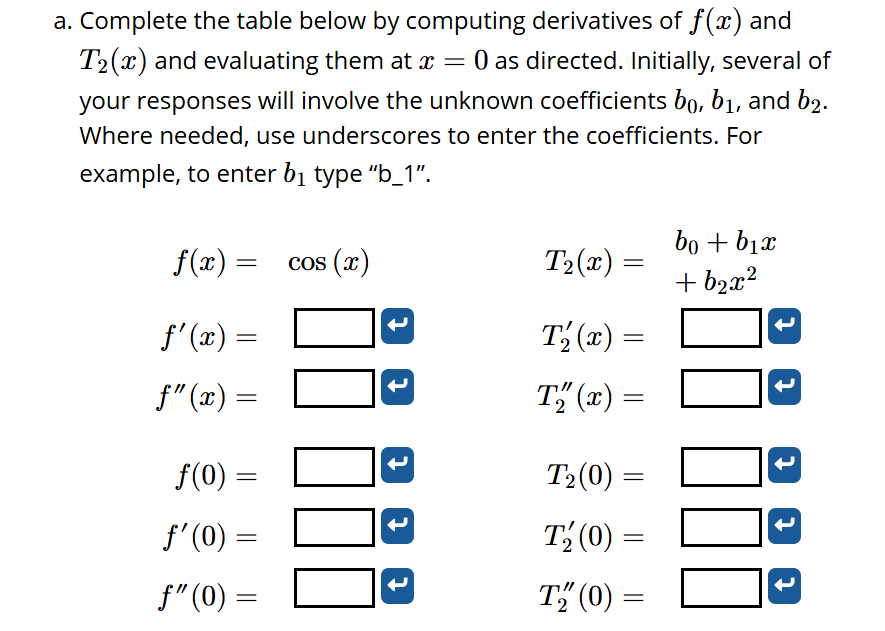
We have several exercises involving things like this: Doenet
(This is roughly the width that Doenet exercises appear within AC).
I think it’s pretty important that this part of the exercise appears as two columns, one for the function and one for the Taylor polynomial, and that those columns are aligned, as we are setting corresponding entries equal to each other. I also think it’s pretty important that within the columns, the equations are aligned at the “=” and the start of the answer boxes. Within PreTeXt we accomplish this using md and mrows instead of tabular, but md can’t contain answer boxes in Doenet.
However, using a tabular within Doenet means that the vertical alignment of the “=” and the answer box is a little off. It also means I can’t use “label” for accessibility because the meaning of what needs to go in the answer box is in a different cell from the answer box itself. This whole thing is probably an accessibility nightmare since it’s using a tabular for visual layout.
Are there things that already exist that I don’t know about for how to accomplish this?
Not yet sure the best way to handle this situation. But, for the answers, you’ll definitely need to use a <shortDescription> so that screen readers can know what is supposed to be in the box. Unfortunately, short descriptions (aria-labels) are straight text, so you have to spell out the mathematics. (There’s no MathJax that can render math for the screen readers.) You’d have to do something like (I think)
<shortDescription>T sub 2 prime of <number>$a</number></shortDescription>
I wonder if we need to add a labeledBy attribute to allow you have the label in a different object. Then you could do something like
 <cell halign="right"><label name="l1a"><m>f'($a) = </m></label></cell>
 <cell><answer name="f1a" labeledBy="$l1a">$$fP($a)</answer></cell>
and have the answer be linked to the label even though it is in a different cell.
Unfortunately, the alignment from <md>, etc., is formatted by MathJax, and we don’t have a way to put answer boxes inside MathJax. (Ximera came up with a way to do this, though.)
It’s also lovely how the vertical alignment of the math with the answer blanks is messed up in the tabular.
I made this issue.
Yes, that is definitely not ideal.
I got the table in this activity Doenet to look better by aligning rows to the top, but there’s less going on in this table; specifically, only 2 cells per row, every thing to the left of the = is the same width and in the same cell as the answer box, and so I can use label with it. I’m pretty sure I tried aligning the rows to the top (and bottom, and middle) in the first linked activity, to no avail. Maybe there were slight changes, but it still didn’t look right.
Actually, looking how html does it, we would want to add a for attribute to the <label>.
 <cell halign="right"><label for="$f1a"><m>f'($a) = </m></label></cell>
 <cell><answer name="f1a">$$fP($a)</answer></cell>
I made this issue.
Oh, that would be useful far beyond this use case! Instead of copying and pasting things into a label in the answer, we could leave the text where it is and say it’s a label for the nearby answer? That would have eliminated the need for a left and right position for the label.
Yes, I believe that is how it would work. As long as the text or math is in a <label>, you could leave it where it is and just use the for attribute. Right, the labelPosition attribute would largely be moot, though that’d also be a legitimate to specify its location.
A fix that lets you separate the accessible label from the answer is now available on the dev version of DoenetML. For version “0.7dev” (version=“dev” on PreTeXt), <label> has a for attribute and this is will be deemed accessible.
<cell halign="right"><label for="$f1"><m>f'(x) = </m></label></cell>
<cell><answer name="f1">$fP</answer></cell>