It would be nice if the style numbers would carry over to the text in Choice Input when “inline” is turned on. I am having students pick between two options: V1 crimson dashed and V2 blue dotted. Here is an example of what I mean:
Also, on a related note…answers checking on inline is also an issue. It would be nice if those could turn green somehow when correct.
Particularly when using: “div sectionWideCheckWork forceIndividualAnswerColoring”
I added this feature request. I suspect this is possible now that we have migrated inline choice inputs to a more flexible system that has support for styling different pieces of it.
I’m not sure what you would like to turn green. Right now, in the scenario you mention, the border of the inline choice input turns red or green depending on the correctness of that answer. What else would you like to turn green? Or is it just that the green border is too subtle?
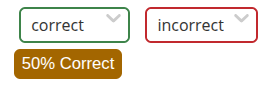
<div sectionWideCheckWork forceIndividualAnswerColoring>

  <answer inline>
    <choice credit="1">correct</choice>
    <choice>incorrect</choice>
  </answer>

    <answer inline>
    <choice credit="1">correct</choice>
    <choice>incorrect</choice>
  </answer>
</div>
I see. It looks like the color changes automatically when the correct answer is hard coded (as in credit=“1”). I am writing questions where the correct answer depends on a boolean and the value of another variable, so I am using a “choiceInput” to display the options, then a separate answer-award-when scheme. My guess is it is because I am using choiceInput instead of answer?
I’ve added another example to my MWE: Doenet . Particularly this is an issue when I change to sectionWideCheckWork. If I keep it as individual answer checkers it’s fine, since they can see the check work button change.
You can also see it here:
Multiplicity and Behavior at Zeros section in this activity: Doenet.
I know this is a “features request” discussion, not a help discussion, so I can move over to a new discussion if needed. P.S. How do you type tags so that they show up here?
We need to figure out how to turn this off, but this forum software tries to parse tags like <math> as though they were HTML and then swallows them. The way to make them appear is to click the </> button for “preformatted text” or, equivalently, surround the tag with backticks.
That’s right. If Doenet can figure out that the input is associated with the answer, then it will, by default, color it according to the correctness of the answer. (You can turn that off by setting colorCorrectness to false.)
If you have an input outside the answer, then you can link it to the answer by setting the forAnswer attribute of the input. This is usually a good idea to do, because then it also links the input to the answer for recording data. In the gradebook, the values of the inputs will be shown for each answer submission as the student’s response.
Here’s an example.
<choiceInput name="ci" inline forAnswer="$ans">
  <choice>correct</choice>
  <choice>incorrect</choice>
</choiceInput>

<answer name="ans">
  <award><when>$ci=correct</when></award>
</answer>
That is exactly what I needed–to link the answer to the choiceInput.
I had figured out an alternate approach and I wonder which would be computationally faster:
- Separate answer-award-when, where the when is based on a somewhat complicated boolean. This is what I am currently doing.
- Using Conditional Content to print different questions where the answers are hard coded. For example, if there are two different versions of the problem (V1 answer is A, V2 answer is B), then I just write two versions of the problem, but print the one I want based on conditions.
I’m not sure which would be faster. I do know that the sheer number of components in a document is one good predictor of the speed. Now that my sabbatical is over and I’ll need to start writing activities again, I’ll get more familiar with what makes Doenet slow. @Anurag_Katyal or @Virginia_Mae may have better ideas on which option might be faster.
One consideration is that when a branch of a conditional content has never been selected, Doenet doesn’t even create those components. Conditional content can be used to speed up document initialization by postponing creation of some components until they are needed.
My guess is that it’s my graphs and a lot of the other features (sliders and so many variables) that are slowing things down, but I might experiment with this idea to see if conditional content makes it faster.
I’ve found, in really long activities, it’s better to not have one massive setup at the top of the activity but stick smaller ones where they are needed alongside conditional content. makes a marginal difference.
Alternatively, I just blame the school WiFi, which is positively atrocious. 
I’ve struggled with this personally. I’d much rather watch 5 minutes of ads at the start of a movie instead of watching 30 second ads 10 times every so often. I’d rather just get the delay over with at the start but slow build times make authoring somewhat annoying. Thats why I started splitting up my setups where a bunch of selections were happening.
Keep an eye on ram usage. With some extreme cases, especially when there are a lot of graphs with a lot going on with each graph, the activity can start eating up a lot of memory. Hovering over a tab in chrome can show you how much memory is being allocated to that tab. Depending on how much ram your machine has, that might be contributing to the slowdown as well.
Would it be better to use conditional content around graph heavy features instead of cascades or hide?
For example, right now my graphs appear based on answers being achieved (using a hide=$ or cascade).
If I used conditional content instead, the graph wouldn’t render until later? So maybe the initial load time would be faster?
I had a whole bunch of setups blocks, then moved nearly all of it to one at the top because I thought it was cleaner than way.
The load time is frustrating when I’m just trying to see if a new change did what I wanted.
I have some hour long activities inside cascades that load reasonable quickly so I don’t think they are contributing to the slowdown. It’s most likely the graphs. Try placing them inside conditional content instead of using hide conditions. Also, you have one graph with a lot of things happening inside it. I tend to use to multiple simpler graphs. Makes the activity longer but speeds things up a bit. Another trick is to build various parts in different activities/documents and then bolt things together at the end. Makes rapid prototyping a little easier. Copy over just what you need to get that piece working.