What is the best way to let a user enter a vector as an answer?
Trial and error suggests that an input like <1,2> will not work. (I would like it to!)
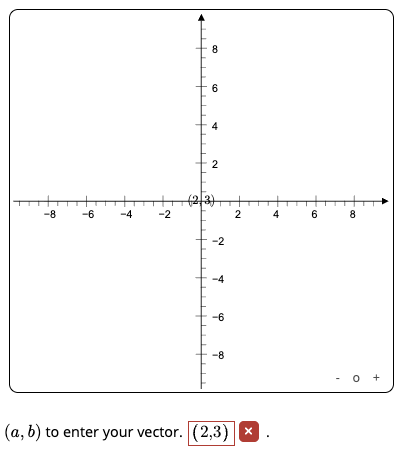
I can have the user input (1,2), but this is understood by Doenet as a point, not a vector. So if I want to use vector operations in answer checking, this isn’t directly supported.
The best I’ve come up with is to do:
<mathInput name="pointA"><label>Use the syntax <m>(a,b)</m> to enter your vector.</label></mathInput>
This works, although I expect that even with the label explaining the syntax, students are going to use angle brackets and get confused when it doesn’t work.
Doenet’s <math> recognizes both \langle 1,2 \rangle and (1,2) as vectors in the mathematical sense. They both behave more-or-less the same, except that only (1,2) can be coerced into an open interval.
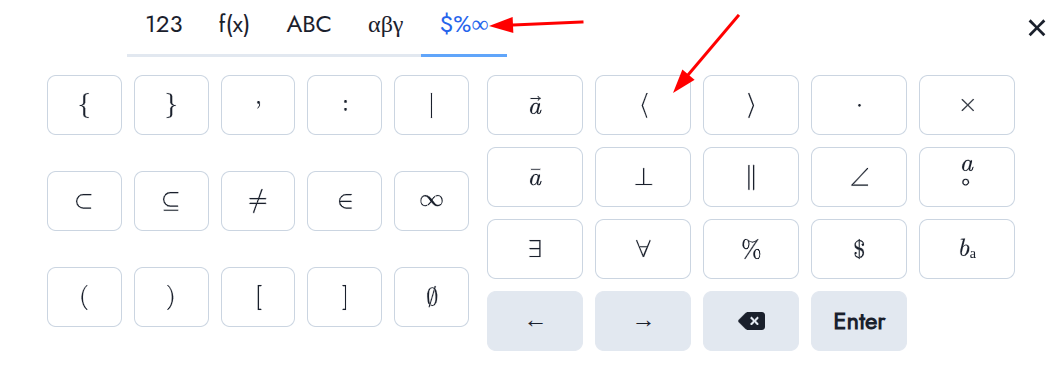
For student input, the <mathInput> does not accept < or > as delimiters. For a student to enter \langle or \rangle, since they presumably wouldn’t know the latex, they would need to use the math keyboard in the lower right:
From the keyboard palette, the can select the $%∞ tab and then click the buttons corresponding to the angle delimiters.
Does that help? I’m not too excited about interpreting less than and greater than signs as angle brackets, so I hope having the keyboard buttons will be enough. I’m not sure we’ve had this stress-tested by someone using the angle bracket notation for vectors.
Thanks. It seems like it makes most sense to provide instructions to use parentheses in that case.
I was a bit surprised that (1,2) in a mathInput doesn’t get treated as a vector (since it does inside math). For example, I can’t apply magnitude directly: I have to add a conversion step first.
Curious why <mathInput prefillLatex=”\langle { }, { } \rangle”></mathInput> does not display anything. In fact, <mathInput prefillLatex=”\langle \rangle”></mathInput> does not display anything either.
and both got graphed. I am guessing that vec is just an ordered pair until the author does something with it. When passed into a <point>, you can access coordinates and other properties of the ordered pair as if it were a point. Similarly, passing it into a <vector> seems to allow you to find things about it as if it were defining a vector. An input of (2,3) could be a point, a vector or the open interval from 2 to 3 (or something else entirely). Passing that input to a specific enclosure of <point>, <vector> or <subsetOfReals> likely allows for the magic to happen.
My main goal was to figure out the answer checking: for arbitrary student input, can I check if it is/is not parallel to a given vector? Can I compare its magnitude to the given vector?
I wasn’t able to do the magnitude comparison until I converted the student input to a vector. There’s probably a better way to do it but I don’t really know what I’m doing!
I don’t think I am explaining things well here. Hopefully, Duane will come to my rescue tomorrow.
Imagine I asked you to graph (4,6) on a sheet of paper. How would you know to graph the vector and not the point or the interval? Now if I asked you to graph the vector (4,6) on a sheet of paper, there’s no ambiguity as to what (4,6) represents because I’ve added context. Similarly, Doenet doesn’t know that the math input of (4,6) is a vector until you tell it (by placing the math input inside the vector component).
Ah, now I understand. I thought you put it in a <math>, and a <math> (nor a <mathInput>) does not have a .magnitude property. Should they? But, a <vector> indeed does. That’s why converting to a <vector> was required.
We do expose .x, .y, etc., on a math/math input. The trouble is that if we added a .magnitude, we’d have to think about what type of mathematical objects might have a magnitude. Scalars, vectors, matrices, …