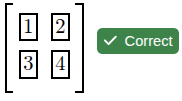
Should we color the box answer answer blanks to indicate if an answer is correct, as in the below example?

I think it would only work for automatically generated answer boxes from a tag like <answer>x</answer>.
Should we color the box answer answer blanks to indicate if an answer is correct, as in the below example?
I think it would only work for automatically generated answer boxes from a tag like <answer>x</answer>.
I think that’s a nice feature. Sometimes when checking exercises I’ve written, I put results in answer blanks but forget to hit the “return” icon and only later realize I haven’t formally submitted. The color around the full box is a good visual cue.
To play the devils advocate, I think this has the potential to cause frustration amongst new authors who might come to expect the pretty colors in all manner of inputs instead of understanding that the behavior is specific to a specific component.
For context, I love the idea but wonder how new users would react to the first non-colorful input box they run into.
@Anurag_Katyal, are you referring to the case where we have an <answer> that depends on inputs that are outside the <answer>?
What if we add a forAnswer attribute to the inputs that indicates they should get their color from the correctness of that answer? Does that address your concern?
For example, we could have this DoenetML:
<p>
    <textInput name="a" forAnswer="$answer1" />
    <textInput name="b" forAnswer="$answer1" />

    <answer name="answer1"><award><when>
        $a = a and $b = b
    </when></award></answer>
</p>
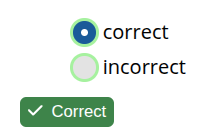
And it could render like this when it is correct.

I don’t know how to handle <matrixInput>, so these answer blanks would not be colored, at least for now.
<matrixInput numRows="2" numColumns="2" name="m" forAnswer="$ans" showSizeControls="false" />
<answer name="ans">
  <award><when>
    $m =
    <matrix>
      <row>1 2</row>
      <row>3 4</row>
    </matrix>
  </when></award>
</answer>
I think I have the colored answer blanks working now. (The new code is in PR #829). I’m not sure about the names for some attributes, but here’s what I came up with.
<answer>s are colored to show their correctness. To turn that off, you’d need to specify colorCorrectness="false" in the answer or one if its section/p/li/span/div/document ancestors.<answer name="ans"> with forAnswer="$ans", it will be colored based on the answer unless you specify colorCorrectness="false".sectionWideCheckWork (or a documentWideCheckWork to the <document>), then the inputs from the enclosed answers will be colored based on the overall credit achieved of the section. That way, by default, this change won’t start giving more information about which answer is correct.forceIndividualAnswerColoring to the tag with the sectionWideCheckWork. This will now give students more information about which answer blanks are correct.Any feedback on how this should work or what attributes should be called is welcome.
If there aren’t any objections, I could get this out by the end of the week.
I agree with both Matt and Anurag – I like the visual cue, but would also worry if it works in certain situations or types of questions. The forAnswer attribute helps that, but only if authors actually make use of it. Is there a good way to encourage that good behavior from authors?
Since you’re asking about potential tag names – I was trying to think of some variant of forAnswer which hint at the fact that it’s used for coloring. But I just can’t imagine asking somebody to write something like colorAccordingToCorrectnessOfAnswer…
In Mathematica and some other languages there are tags/functions like ColorFunction. Some variant of that would be my only other idea, but I don’t know exactly what. colorAnswer = … gets at the idea that the component will get colored according to the (correctness of the) named answer… but “colorAnswer” just doesn’t really seem right?
If there was a way to identify that an input was associated with an answer, one could give a warning to authors that they didn’t add forAnswer. But, if I could identify that, I wouldn’t need authors to manually add forAnswer!
I played around with trying to automatically identify that an input was associated with an answer. But, then I realized one could author a document where the same input was used in multiple answers. DoenetML is too flexible, and there isn’t a unique way to automatically assign which input goes with which answer.
I think for the attribute currently named forAnswer, the name should be more generic than coloring. I could imagine that the attribute could eventually be used for other purposes where we want to have the input and answer linked. For example, we could eventually use it to automatically determine that the input is a response for the answer.
Still thinking about your last response, Duane.
What if I wanted to limit the number of attempts for a free-response question? How would a student know when they have run out of attempts? How does Doenet know when a student is finished typing in everything they wanted to?
At this point, we don’t have much in the way of auto-grading capabilities for free-response questions. They are usually hand-graded, and we don’t have a concept of attempts. Students can just keep updating what is in the box, and Doenet will display the last response of the student in the instructor page.
If Doenet can figure out that the input box was the response for the answer, it will also save the entire history of submitted responses that the instructor can view. Then, the instructor could look at the time-stamped list of submitted responses and decide which one to grade.
I misspoke. I meant a math input when I said free response.
For instance, if I have the following question that I want students to have 3 attempts for, how would the number of attempts be counted?
What is 10+10? (((Grr…I had something here, and the platform just got rid of it)))
If the student types in 2, does the box turn red immediately? Does that count as 1 attempt? Once the student types the 0 after 2, is that a second attempt? If the box turns green, then what about the case where a student incorrectly thought that the answer was 200? Perhaps I am not understanding how this would work in practice. How does Doenet know that something has been submitted if the student has not clicked the check work button?
Nothing in this regard has changed. It’s just that now the border color of the math input will correspond to the color of the check work button.
The border color is black when the button says “Check Work” and the user is typing in a response. Then when the user clicks the check work button (or presses Enter), the check work button changes to “Correct” or “Incorrect” as usual, the border color changes, and the an attempt is used up.
As soon as the input value is changed, the button changes back to “Check Work” and the border color returns to black.
Just some feedback from yesterday - students weren’t all that taken by the green boxes. Some said it was too much green all over the place since there were a few answers blanks next to each other.
The default is colorCorrectness="true". One can set colorCorrectness="false" to turn it off.
If other students have a similar reaction to Anurag’s, should the default instead be false?
Or could it be that the change was jarring and that’s what elicited the negative feedback?
The icon to the right is already changing color (green check for correct, red ‘x’ for incorrect, etc.) so I don’t think it matters much if the color of the box changes. I would tend to leave the color of the box static.
I like the colored answer blanks, I think it’s a nice visual cue. As a small nitpick, I would like the box outline to match the color of the answer button, which looks a little darker. In particlar, the current green around the box seems a bit bright.
When I made the thin border dark green, I couldn’t tell the difference between the colors!
I think only “green” the correct answer.
One concern I have is that this nice aesthetic change might just be complicating DoenetML more, considering that you have to use forAnswer sometimes.
Do we want authors to have to figure out why some inputs are turning green and some aren’t?