Here is a warm-up from our Algebra 2 guided notes. Thought it would make a fun warm-up (that is what it is in our notes).
FYI: there is a bug in row 3, where it is referencing line 2:
       <cell><mathInput name="xUser3"></mathInput></cell>
       <cell><evaluate name="sol3" function="$f" input="$xUser3"/>  </cell>
       <cell><m>\left($xUser2,$sol2\right)</m></cell>
Looks great. Is this intentional that the answer to 4.2 also allows one to almost capture (up to bad grammar) the upward shift?

Good Catch, thank you
A couple of thoughts…
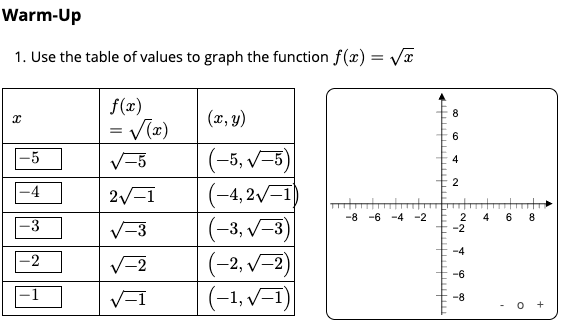
Perhaps it is intentional to not have guardrails here but do students know at this stage that square roots of negative numbers are not real numbers and therefore the coordinate pairs in the third column cannot be graphed? Also, maybe the widths of the columns could be made unequal to allow for wider outputs to stay within the table.
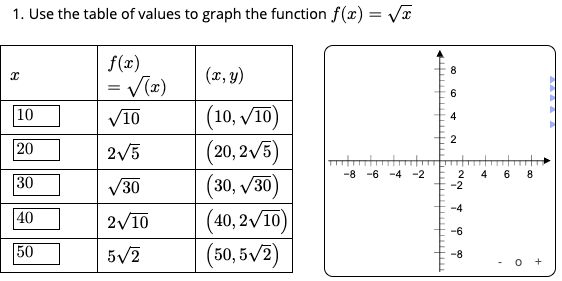
On the other end of the guardrail spectrum lives this set of inputs with nothing graphed either. Are students accustomed to typing in the first five natural numbers to where this is a non-issue? If not, one could play with values of xmin, xmax, ymin, ymax for the graph based on user input to zoom appropriately.
1 Like
I could preset the x-values and maybe ask a question on why I chose the specific values. What other values could I use? Are their values that don’t work, etc. This is a review and for Algebra 2 (at our level) they have already had extensive time with functions and transformations of many of the parent functions.