Once you are finished, please share your unlisted activity as a response to this thread before 12 PM Eastern so folks have a chance to play around with your take on the activity.
Hi Rabia, thank you for submitting this! I’m working through a review and will post one bit of advice at a time
First, for the second part of the first factoring problem, where the user is able to enter the factors in either order:
The issue here in your source is that the student doesn’t have to factor at all, for example try entering “x^2 - 9x + 20”. Here is an alternative way:
The symbolicEquality attribute prevents the student from entering the quadratic unfactored, but the simplifyOnCompare attribute relaxes this requirement slightly so that the order of the factored terms can be switched. Test it and see!
(Here, also note that the correct place to put the problem label is inside the answer tag)
(Edited by Duane so you can see Virginia’s solution. Right now, these posts hide tags if you don’t put them in a code block – it tries to interpret them as HTML.)
Hi Jennifer Question 4 of the top part isn’t being as strict as one might want it to be - it is accepting equivalent correct answers as well. Additionally, question 4 of the bottom part has a numerical gcf. How could we be certain that g(x) factors to (ax+b)(cx+d) exactly (with no gcf)?
For your multiple-part multiple choice problem, this part wasn’t working because the <answer> tag didn’t have an <award> component. I see that you added credit="1" to the correct choices, but unfortunately this only works when the choices are inside their own <answer> tag, rather than just a <choiceInput> (Think of <choiceInput> as just an input on a survey form, just for collecting responses.)
Here is one way that the problem can be resolved:
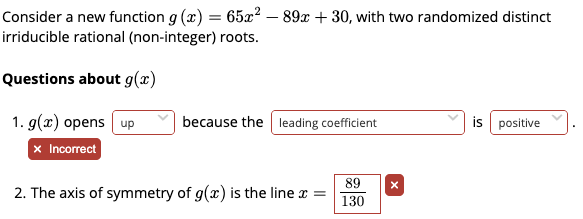
g(x) opens
up
down
because the
degree
constant term
leading coefficient
multiplicity of the smaller root
is
positive
negative
zero
.
 <answer name="answer1">
   <award>
     <when>
       $direction = <text>up</text> and
       $reason = <text>leading coefficient</text> and
       $sign = <text>positive</text>
     </when>
   </award>
  </answer>
</part>
Also note that because you used the forAnswer attribute in all of your choiceInput components, there’s no need to use a <considerAsResponses> component in the final <answer> as well!
Another way to do this is to NOT shuffle the choices. Then you can use the selectedIndex property of the named <choiceInput> and just give the number of the correct choice in the award statement.
However, Anurag made that impossible but having you guys shuffle . Here’s the solution code if unshuffled…
 <part>
     <m>g(x)</m> opens
    <choiceInput name="direction" forAnswer="$answer1" inline>
        <choice>up</choice>
        <choice>down</choice>
      </choiceInput> because the

   <choiceInput name="reason" forAnswer="$answer1" inline>
        <choice>degree</choice>
        <choice>constant term</choice>
        <choice>leading coefficient</choice>
        <choice>multiplicity of the smaller root</choice>
      </choiceInput> is

   <choiceInput name="sign" forAnswer="$answer1" inline>
        <choice>positive</choice>
        <choice>negative</choice>
        <choice>zero</choice>
      </choiceInput>.

     <answer name="answer1">
       <award>
         <when>
           $direction.selectedIndex = 1and
           $reason.selectedIndex = 3 and
           $sign.selectedIndex = 1
         </when>
       </award>
      </answer>
    </part>
As one will discover, there are often many ways to accomplish something in Doenet :).
One can avoid choiceInput entirely and use the shuffleOrder attribute with the answer tag. Here’s a potential solution. Alternatively, you can also stick the sectionWideCheckWork with the <li>.
Hi Rabia!
I noticed that you defined all of the randomized parameters for the final quadratic but forgot to change the function that gets rendered to the student.
I also found a typo in the calculation for b. Here’s a quick document with some comments so that you can see what I mean…Notes on Quadratic Activity for Rabia
Please let me know if you have any questions!

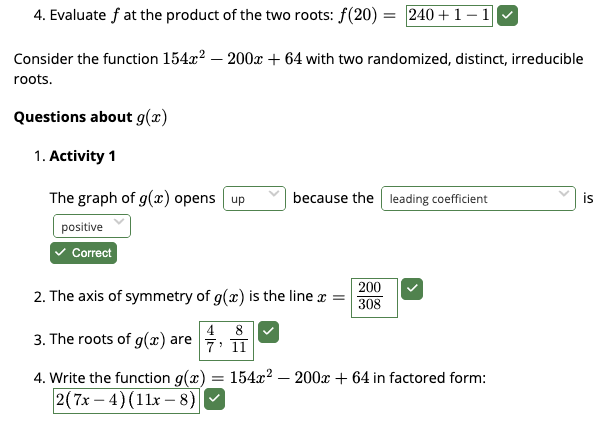
 Question 4 of the top part isn’t being as strict as one might want it to be - it is accepting equivalent correct answers as well. Additionally, question 4 of the bottom part has a numerical gcf. How could we be certain that g(x) factors to (ax+b)(cx+d) exactly (with no gcf)?
 . Here’s the solution code if unshuffled…