I have some items tied to <mathInput> fields and with associated <feedback>. I want to be able to trigger clearing these associated <input> and <feedback> fields, e.g., back to their default values (blank/not shown) inside a <triggerSet>.
<updateValue> fails on referencing the named element (Invalid target for <updateValue>: cannot find a state variable named “value” on a <feedback>.)
What is the property of the <input> to reset with <updateValue> to make it blank again?
The weird code I’m wrestling with is at: Doenet . The failing <triggerSet> is at the end.
Thanks for the help.
We don’t currently have the ability to reset a feedback with an <updateValue>. A feedback will always be shown if its condition evaluates to true. The way to make a feedback disappear is to change something inside its condition statement so that it evaluates to false.
In this example, accomplishing your desired behavior is made more challenging because you are butting against Doenet conventions by using sampleRandomNumbers rather than selectFromSequence to choose your randomly selected parameters.
Doenet is sufficiently flexible that there should be some clever way to come up with a bookkeeping variable that you could update to reset the feedback, but I worry that may make the activity more complex than is needed.
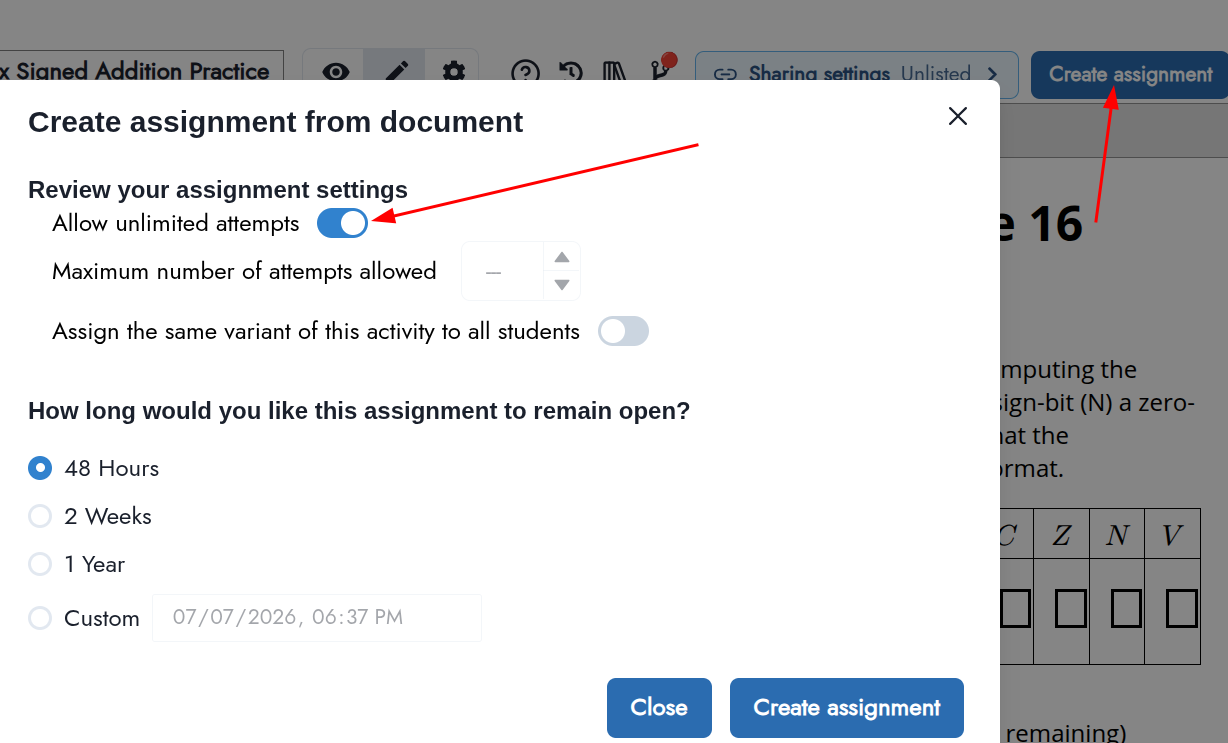
If, on the other hand, you use one of the select* tags to choose random parameters, then, when assigning the activity to students, you can given them multiple (or unlimited) attempts. In that case, students will see a “New Attempt” button that will select new parameters and reset the activity to a blank state.
The “selectFromSequence” element doesn’t work well with the intention of this particular page.
When this is given as a graded assignment, that version uses the “selectFromSequence” element. This page is designed for interactive in-class (or independent) use, allowing students to choose to reset and retry the problem - to keep playing with it until they feel they understand how to do the work.
This has a moderately complex “feedback” logic, but how to turn it off is the question. I’ll try using the two booleans reset with the “reset” button.
Making it easy to create practice problems for students seems like an important feature to me. Although you could do that with boolean logic, Doenet should make this easy. So, can you bear with me a bit to understand better your use case and why it doesn’t work with the Doenet assignment?
I made this assignment from changing your activity to selectFromSequence, presumably similar to the “graded assignment” that you mentioned you made. Since I created the assignment with unlimited attempts, there is a New Attempt button that clears the assignment and gives a new randomly generated variant.
Why doesn’t something like this work for student practice? Are there some changes we could make so that it could work for student practice? If you are using Doenet in PreTeXt, that assignment mode doesn’t work, so we definitely have work to make such new variants available there.
We could allow authors to expose a “New Version” button directly on the page, which might be what we have to do to get this feature to work with PreTeXt. It’s not yet clear to me how that would integrate with systems using Doenet, like Runestone and PreTeXt. But, I feel we might need to go in that direction.
Any guidance you could give about how we could best support how you want to use these activities would be appreciated. And thanks for your patience as we develop how assignments should work in Doenet.
If you want to do this the hard/creative way, I recommend creating a showFeedback boolean and conditioning the feedback on that boolean being true. Then, you’d need to trigger an updateValue with the answer submission to set that to true and include in your reset triggerSet an updateValue setting that boolean to false.
Hi Duane
Thank you - can i get the source for this? I only shows the activity. This looks like it could work very well. I’d started with these as select options.
I figured out how to clear the entries, but not the feedback.
To clear the input boxes, i used the following inside the associated triggerSet:
  <updateValue target="$OverflowBit_Ans" type="text" newValue="" />
  <updateValue target="$SignBit_Ans" type="text" newValue="" />
  <updateValue target="$ZeroBit_Ans" type="text" newValue="" />
  <updateValue target="$CarryOut_Ans" type="text" newValue="" />
  <updateValue target="$Sum0_Resp" type="text" newValue="" />
  <updateValue target="$Sum1_Resp" type="text" newValue="" />
where the variables are the names of the textInput boxes. Then the logic cleared nicely.
Does this activity properly make the feedback disappear when you click the button? I created a showFeedback boolean that has to be true for the feedback to show. It’s more complex than it should be, but I think it works.
This worked great. I don’t think i would have picked up on the
<updateValue target="$showFeedback" type="boolean" newValue="true" triggerWith="$SumResponse $ControlResponse" />
piece.
Thank you!
Hi Duane
Can I get the snippet that makes the values reset? The link to the unlisted code doesn’t have the button at the top.
The New Attempt button at the top is not part of the DoenetML document itself. It is part of the assignment created by the Doenet website app. It will appear if you create an assignment with either unlimited attempts or more than one attempt.
When you create an assignment, you save it in your Activities folders. There are too many steps required now, but you then have to navigate to that folder, open that assignments, and click the Invite Students button to get the URL for that assignment.
(If you are embedding an activity in PreTeXt or somewhere else, we don’t yet have a way to get that button.)