In this discussion (and I think it has come up before as well), the request was made for a preview of how Doenet is interpreting the response that a student has entered into the math input (that is typically implicit in an <answer>). I made this issue to put the request in the near-term queue.
However, I’m uncertain how such a preview should work. Here are some options I can think of:
- When a student is typing in a mathInput and pauses for a set time (e.g., a second), then Doenet attempts to evaluate their responses and automatically displays how it interpreted the response in a popup. (Ximera does this, though without a delay.)
<mathInput> tags (including <answer> tags like <answer>x</answer> that implicitly add a <mathInput>) render a “preview” button to their right. When a student clicks that button, then Doenet interprets what they wrote and display a popup with the result.
This might be confusing with <answer> as there would now be two buttons, the preview button and the check work button. Maybe it would require that authors opt into this feature by adding an attribute to the <mathInput> or <answer> tag.- If we only cared about this only for
<answer>s, we could have a button that shows the most recent submitted response for that answer (i.e., what one gets with $answerName.submittedResponses or the “Submitted Responses” view in the editor and instructor views). Should that always show or only if they got the answer incorrect?
Other ideas?
Between those two I like the Ximera approach. It’s more readily visible and doesn’t require an extra step.
I also realized when replying – I’m not sure I’m qualified to answer this, at least on behalf of the users? I have a really hard time typing any complicated expressions in Desmos, because it automatically creates fractions and moves my cursor to places I’m not expecting, or adds parentheses that I was expecting to type, which means I end up with extra parentheses, and so on.
But I’m also old-school, and accustomed to typing in an expression as a line of text, with parentheses as needed. I suspect a current high school or undergraduate student, raised with Desmos, doesn’t have the same issues as me.
Don’t know if that means it’s worth considering… a “user group”? A few undergraduates who are willing to give opinions every now and then on user interface and entry questions like this? (I’m guessing some UMTYMP students would be willing…)
As an aside – WebWork has always had a “preview” button which typesets the student’s input so they can see how it’s being interpreted. At least in my experience, students rarely use it, and usually forget about it; their eyes glide right over it. But WebWork has also recently implemented real-time typesetting. I haven’t really dug into it, but for whatever reason, I find it works much better for me than Desmos.
Couple more ideas (and these might very well be impossible because I don’t understand the workings):
- There might already be a “description” element on an input box. Could the rendered response become visible there after hitting submit? Could a description element be created if there wasn’t one authored?
- Similarly, could an automatic feedback element be created with the submitted response if it’s incorrect? Maybe if the author had an attribute to elect this (and the previous idea) as an option?
I’ve used a lot of WebWork within PreTeXt, and there is an info button which has the preview on every answer which also turns into the red x or green checkmark. The result is, similar to Jonathan’s experience, that students often forget the button can be clicked on to show their rendered answer or sometimes to get more detailed error messages. It’s simply not needed most of the time for simple answers, when most of the time the only message is “Incorrect.” That’s why I think it might not be a bad thing to have something doenet authors have to opt into that would appear only when there might be helpful info.
Chrissy
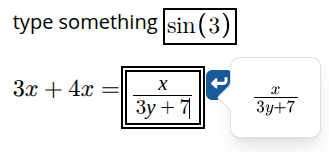
I just created a new showPreview option for math inputs and answers with implicit math inputs. It’s available in the “0.7dev” version on beta.doenet.org (or version=“dev” in PreTeXt).
For example, with this DoenetML
<p><mathInput showPreview><label>type something</label></mathInput></p>

<p><answer showPreview><label><m>3x+4x=</m></label>7x</answer></p>
you get a preview when typing in either box
The default is showPreview="false", so you have to explicitly opt in. I’m not sure if we should change the default to showing the preview.
I had to make some design decisions to make this work (whether or not to have a delay, behavior of tab and esc, what it should do for screen readers, position of the popover). Let me know if you think I should change its behavior.
This seems like a nice feature to have available, but I definitely agree with having the default for showPreview set to false. For the vast majority of the kinds of questions I ask students, it would just be an annoyance. However, I can definitely see that when the answers are more complicated algebraic expressions, this is nice for students who aren’t used to typing math expressions.
I think some delay is good, but the delay seems slightly long to me. It partially blocks the submit button, so I think the positioning should be changed. Maybe below, or else push the submit button to the side?
I echo what Melissa said.
I wonder what this would look like on a mobile device.
I’d agree that covering up the submit button isn’t ideal. In this particular example, there’s not much difference, since the the <answer> component is already doing MathQuill’s preview (e.g. creating the fraction when you type a forward slash). I hadn’t really thought about that. What are some instances where the newly displayed preview would look different than what’s displayed in the answer box?
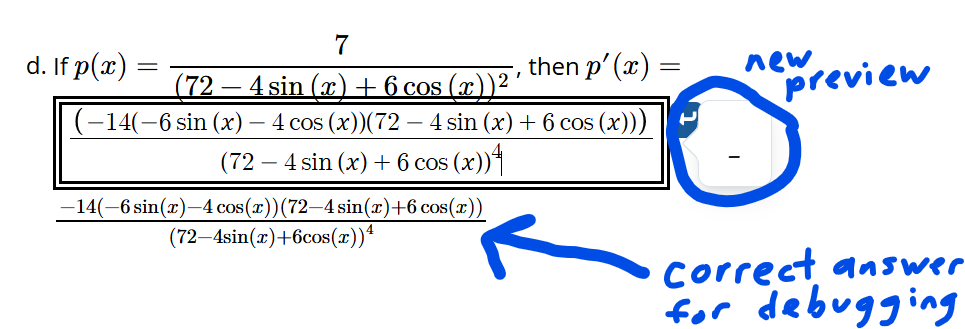
I posted in the support thread that motivated this one, but there’s at least one instance where copying and pasting part of an answer looks good inside the answer box, but the new preview showed “-”.
I think at least in part this is because the trig functions are being pasted with extra spaces before the argument. I copied and pasted from the correct answer I made visible in order to help with debugging, but is this actually a feature and I should tell students that if they copy-paste answers in from “somewhere” they’ll likely be marked wrong?? 
Anyway, this is the kind of thing I was trying to catch when I asked for a preview. Another example would be that earlier on in the course, a student had a double exponent when they didn’t mean to but the MathQuill renderer looked fine because of tall parentheses. Duane fixed that already though.
One thing I was hoping for was some additional parentheses help, and it doesn’t seem the new preview is providing that. I saw at least one student do the quotient rule on something kind of complicated and they didn’t have parentheses in the correct place in part of the numerator, but it wasn’t super obvious - all sets of parentheses were the same heights and whatnot. So maybe there’s more that could be done with that to make a preview more useful?
I agree with everyone else here that authors opting in for only some questions is fine. There are plenty of questions with answer blanks where MathQuill is enough and an additional preview would only be an annoyance.
Oh, and I did notice that if the width of the activity is small, as it can be within the editor/previewer on doenet and also within PreTeXt books, then the new preview appears above the answer blank instead of to the side.
I wonder if there is some way to get more information about what broke the parser and display that in the preview. It would probably be gobbledygook to students, so there’s a risk that will give an unpleasant experience. But, maybe it would be more informative than the long underscore. And it would allow users to convey to the developers what is broken.
Even better would be to get it to spit out messages such as “unmatched parentheses” or invalid character “@”. I’ll add this to the task list.
I finally replied to the support thread suggesting how to check the pasted string for unicode characters that could be breaking the parser.
The preview is supposed to move to a different side if there isn’t enough room on one side. It interprets “room” as the rendered area of the activity, so it behaves differently on the first/last line of an activity.