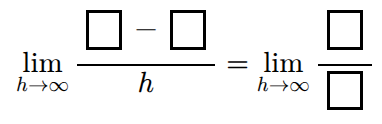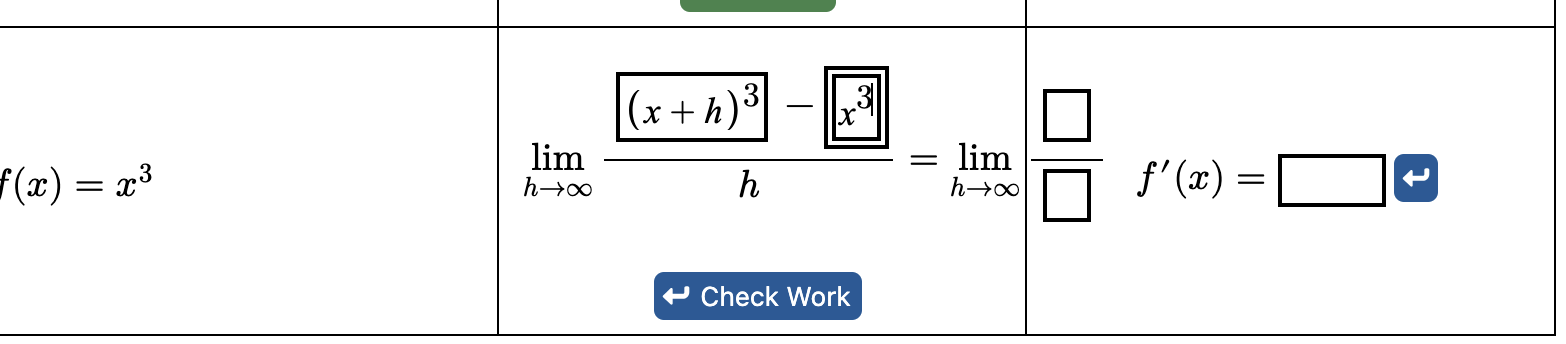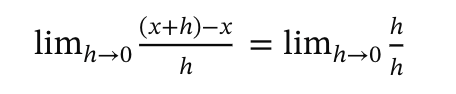
I am trying to have students fill in this expression. I want them to have to enter the x+h and the x, along with h/h
I am putting a table together for organization
<p>Use the <alert>definition of the derivative</alert> to find the derivative of each function below. </p>
  <tabular halign="center" valign="middle" startBorder="minor" endBorder="minor" topBorder="minor" bottomBorder="minor">
  <row>
    <cell halign="justify">Original Function <m>f(x)</m></cell>
    <cell>Limit Definition</cell>
    <cell>Resulting Derivative <m>f'(x)</m></cell>
  </row>

  <row>
    <cell halign="justify"><m>f(x)=x</m></cell>
    <cell></cell>
    <cell>
      <answer>
        <label><m>f'(x)=</m></label>
        1
      </answer>

    </cell>
  </row>

     <row>
    <cell halign="justify"><m>f(x)=x^2</m></cell>
    <cell></cell>
    <cell>
        <answer>
        <label><m>f'(x)=</m></label>
          2x
      </answer>
    </cell>
  </row>
     <row>
    <cell halign="justify"><m>f(x)=x^3</m></cell>
    <cell></cell>
    <cell>
        <answer>
        <label><m>f'(x)=</m></label>
          3x^2
      </answer>
    </cell>
  </row>

  </tabular>
I am stuck on how to use latex and prefilllatex for this. Here is my code:
<p>
  <mathInput format="latex" name="userInput" prefillLatex="\displaystyle\lim_{h\to 0}\dfrac{\left({}-{}\right)}{h}=\lim_{h\to 0}\dfrac{}{}"
    <shortDescription>fill in the blanks</shortDescription>
  </mathInput>
</p>
<p>You entered: $userInput</p>
There are more errors than I can count. Any help is appreciated.
Nick
is missing a > at the end to close the <mathInput.
I haven’t figured out the prefillLatex part yet, as what you have isn’t working.
Apparently, MathQuill (which is behind <mathInput>) doesn’t accept \displaystyle. If you remove that, then the expression shows. It probably doesn’t do what you want with the -, though, as it doesn’t have gray boxes for the operators. MathQuill doesn’t seem to display gray boxes in that case.
Thank you! Because the prefill is latex, there is not gray boxes for them to put answers? I thought having a space would allow that, but apparently I am not correct?
I haven’t figured out a way to get the gray boxes to appear with addition or subtraction in MathQuill. We may have to hack the MathQuill code if the community thinks getting this to work is important. I know @Anurag_Katyal and/or @Virginia_Mae have also unsuccessfully tried to get boxes in these cases.
I was never able to get the prefill boxes to work and tried for quite a bit. I found ways around it, but it was unpleasant. Eventually, I concluded that I needed to ask the question differently.
That is what I ended up doing too.
Question: is the reason you ended switching approaches simply due to the fact that MathQuill was not display gray boxes for expressions like {} + {}? Or is part of the reason just the fact that giving students expressions with gray boxes is not effective in general? (E.g., that students keep deleting the template so that the gray box approach does not help.)
I’m wondering how useful it would be to get gray boxes to appear for {} + {}. I could create a feature request if that would unblock new ways to answer questions. But, I won’t do that if it won’t end up being useful.
(I have no idea if it feasible to get gray boxes to appear for {} + {}, but I won’t investigate unless people think it is a useful avenue to pursue.)
I felt that students may not know to fill in those gray areas. I could tell them of course. With switch, my hope is they will write the expressions out for f(x+h)-f(x) and simplify them out. In my opinion they would be useful as it would make where students need to input terms, etc more consistent.
Would it help if we found a way to get a <mathInput> working inside math so that this DoenetML
<me>
  \lim_{h \to \infty} \frac{
  <mathInput minWidth="20" name="e1" /> - <mathInput minWidth="20" name="e2" />
  }{
    h
  }
  =
  \lim_{h \to \infty} \frac{
  <mathInput minWidth="20" name="e3" />
  } {
  <mathInput minWidth="20" name="e4" />
  }
</me>
resulted in this with four boxes?
YES! Similar to answer, how do they know if what they entered is correct?
I just released a new dev version with the ability to add <mathInput>s inside math. To test this out until the next official release, you’ll need to switch to version “0.7dev” in the settings tab for the document. (If the lower left corner doesn’t say “v0.7.25-dev.523” or later, then you may need to wait, hard reload, use a different browser, or clear your browser cache.)
Then to make an answer based on these inputs, you need to name them and then reference them inside an <award><when> of an answer. For example, you could do:
I just released a new dev version (523) that adds support for math inputs inside math. To test it out, you can switch the document to version “0.7dev” under the Settings tab. If the lower left corner doesn’t say “v0.7.25-dev.523” or later, then you may need to hard reload, try a different browser, clear your browser’s cache or wait for the browser to eventually update.
To create an <answer> based on these inputs, you need to reference them in an <award><when> of the answer. Here’s one way to do it where I made one Check Work button for all four inputs.
<me>
  \lim_{h \to \infty} \frac{
  <mathInput minWidth="20" name="e1" forAnswer="$ans" />
  -
  <mathInput minWidth="20" name="e2" forAnswer="$ans" />
  }{
    h
  }
  =
  \lim_{h \to \infty} \frac{
  <mathInput minWidth="20" name="e3" forAnswer="$ans" />
  } {
  <mathInput minWidth="20" name="e4" forAnswer="$ans" />
  }
</me>

<answer name="ans" matchPartial>
  <award><when>
    $e1 = x+h and
    $e2 = x and
    $e3 = h and
    $e4 = h
  </when></award>
</answer>
In this example, it shows partial credit and the input boxes are uniformly colored based on the overall credit (because of the forAnswer attributes).
If you wanted to have the color show which answers were correct/incorrect, you have to use a slightly more complicated form of the answer, with a separate award for each input.
<answer name="ans" matchPartial colorInputsSeparately numAwardsCredited="4">
  <award credit="0.25"><when>$e1 = x+h</when></award>
  <award credit="0.25"><when>$e2 = x</when></award>
  <award credit="0.25"><when>$e3 = h</when></award>
  <award credit="0.25"><when>$e4 = h</when></award>
</answer>
This was really nice of you to do for me. Thank you
No problem! This is a feature that we’ve wanted to have for years, but I always thought it was impossible. (I wouldn’t have been able to figure it out without significant AI assistance.)
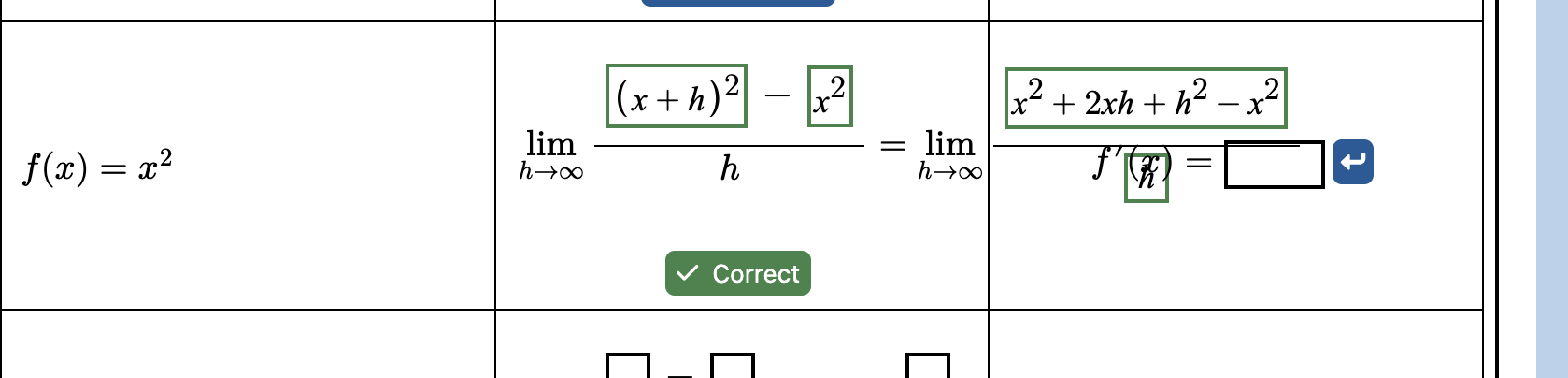
Small formatting issue. Is there any way
to correct the overlap that happens when students fill in?
@Virginia_Mae, any suggestions for the formatting?
My inclination would be to put each side of the = on a different line.
That is what I was thinking as well. I didn’t know if there was another command I was missing to stop the overlap of the entry in input (e.g., fixed)
We don’t have a maxWidth attribute on a math input that could check its growth. I don’t know if that is possible; it would probably lead to undesirable behavior.
I don’t have any bright ideas on this one, unfortunately. It feels like the horizontal format might just not be the best solution for this student workflow, although it’s a helpful organization before they start to work on it!
It’s almost like we need a frame within a page that can have infinite horizontal width and a scrollbar. Like a spreadsheet.
Does that work in a spreadsheet? @Kris_Hollingsworth1 would be the man to know…